Since the last update I have added in new functions that walk through the folder structures recursively. If a new folder has been added to the project this new function will update the folder to have the correct color. All you need to do is run the function, save and restart the project and the folders will have been updated. For future updates I want to make this a startup script that is added into ue4 project so that all this will work automatically in the background.
Showing posts with label tech art. Show all posts
Showing posts with label tech art. Show all posts
Thursday, July 30, 2020

Thursday, July 23, 2020
Folder Color Structure UE4 WIP 2
Since the last update I have restructured the Json file so that it is easier to read and adjust if needed. Each of the folder sections created now have their own color associated with it. I am using HSV colors instead of RGB colors in the code so I have more control of how the colors look in engine.
Tuesday, July 14, 2020
Folder Color Structure UE4 WIP
For my final tech art assignment I am creating a folder structure in UE4 with folder that are color coded. I am using C++ and Python to do this. For this work in progress I have so far created the folder structure in the UE4 project and have given the newly created folders a blue color.
The reason for this project is so that projects in unreal can have a universal folder structure and can be color coded. I have found that color coding folders has made finding and placing files in the correct location easier.
Saturday, June 13, 2020
Project Management Tool Updated
Thursday, June 4, 2020
Project Management Tool Finished
This tool is to help organize projects so that they are easily accessible and manageable. This creates and saves projects with their folder structures. The user can delete and open the assets projects from this tool. It also allows the user to create new assets, and it automatically places them in the projects folder structure.
Sunday, May 24, 2020
Project Management Tool Pt.1
I am creating a project management tool for tech art class. The goal of this is to create a tool that will help you create, manage, rename and delete projects. This tool will also help you create assets for each project as well as delete them as well. This tool will allow the user to open assets with this so that they make sure the files are correctly named and the correct software is used for each asset.
This video shows some safe guards of making sure naming convention is followed and that projects are not overwritten.
This is the UI I have at the moment.


Thursday, April 9, 2020
Learning SolidWorks
I wanted to learn about solidworks so I did a quick tutorial. This is what I came up with. It looks like Pacman to me.


Wednesday, April 8, 2020
HLSL Intro
In tech art class we are starting to learn HLSL very fast. For this week I made a shader that has red and green lines. I used the shader tool from steam to help connect the nodes together. I used HLSL (also known as DirectX) to create this shader.


Monday, March 30, 2020
Nico Face Rig
This is a joint based facial rig. Nico has set driven keys to drive the facial movements.
Friday, December 20, 2019
Animatronic Eye Rig
Animatronic Eye Rig
I did this as part of an exercise to do animatronic parts as a rig. I did eyes with plates that would move as if in a robot.
Final Animatronic Jaw
Final of the animatronic jaw movement with skinned face
This includes a breakdown of the solider saying the word maggots. This shows the talking model, the robotic breakdown underneath, and the joints underneath that. At the end you see the moving parts of all the mechanics once again to show how it all came together.
Animatronic breakdown part 5
This is the final breakdown of the jaw animatronic rig. To do the upper and lower lip I did a basic lever kind of mechanic. It give an easy way to pull the lip up and down to give it a nice lip syncing ability.
Animatronic Break part 4
This shows how the I did the lips on the side. There is a RP ikhandle and a single ikhandle on top of it. This give it the mechanical ability needed for an animatronic but also the animator freedom of accurate lip syncing.
Thursday, December 19, 2019
Animatronic breakdown part 3
In this video I give you a close up look on how I did the corner lip mechanics. It was made using the same method as the jaw movement. This method gives the user the ability to move the corner lips not only up and down, but also push and pull it forwards and backwards.

Animatronic Breakdown Jaw part 2
In this video I show how the jaw joint mechanic is used in action to make the jaw plate and lower teeth move. The robotic joints would move the plate up and down as shown.
Animatronic Rig Breakdown Jaw part 1
This video shows how I created the joints for the jaw movement. It was tricky to get them to work together seamlessly but by parenting the ikhandles to the parent joint it worked.
Animatronic Rig Inspiration
Inspiration for Animatronic rig
For my tech art final for my first semester, we were asked to do a personal project. After going to one of the Disney theme parks I was inspired to try and build an animatronic rig. I wanted to build the infrastructure of the robot, and then after skinning it use that to "push" the skin of the face.
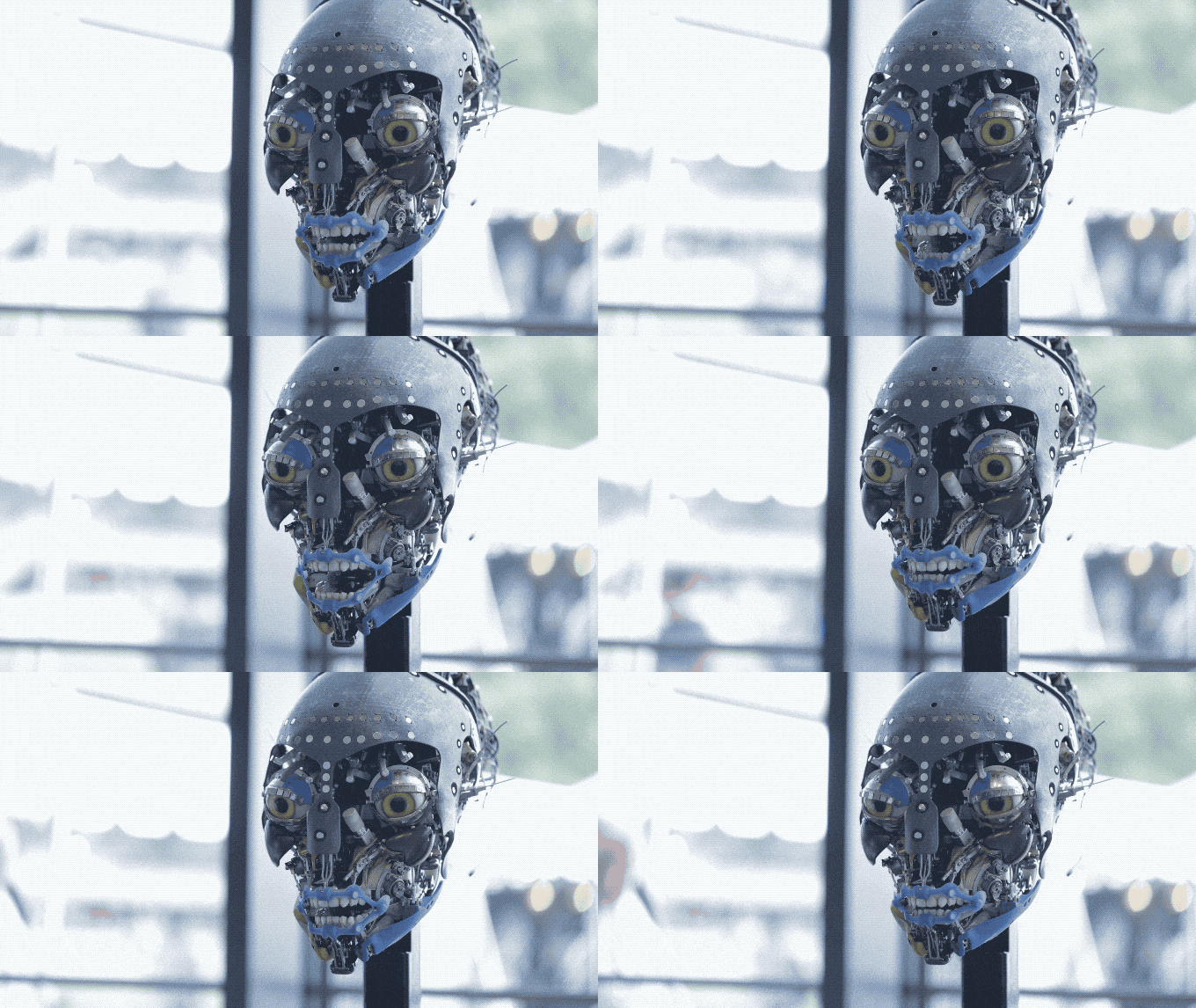
After doing some research I found this animatronic created by Disney for one of the Avatar rides.

The first challenge I wanted to tackle was creating the jaw movement. I wanted to create these two mechanical joints that not only work together, but also only have one degree of freedom.
Tuesday, November 26, 2019
Python Houdini assignments
Class Houdini
For this assignment I created a class inheritance script that uses modules I created with python to call upon their classes to create "Roberto" and "Crag"
Color Calculator
For this assignment I created a color calculator using classes in python. It takes in the user input to create color swatches. It then show it can multiply, add, subtract, and invert the colors and create a new swatch. Its useful for lighters so that they know how color combinations look together.
Random Objects places on Grid
For this assignment I created a python script in houdini that asks the user for the number of objects they want to use to populate the scene. Then Houdini creates a that amount of objects using random geometry, translation, scale and rotation to place on the ground plane.
Monday, October 28, 2019
Python HW 1
Python HW 1
For this homework assignment we needed to use Houdini python to create a script that asks the user for how many objects, what kind of object, and scale. It then takes the information provided and creates it and then places them in a circle.
For this homework assignment we needed to use Houdini python to create a script that asks the user for how many objects, what kind of object, and scale. It then takes the information provided and creates it and then places them in a circle.
Subscribe to:
Posts (Atom)